
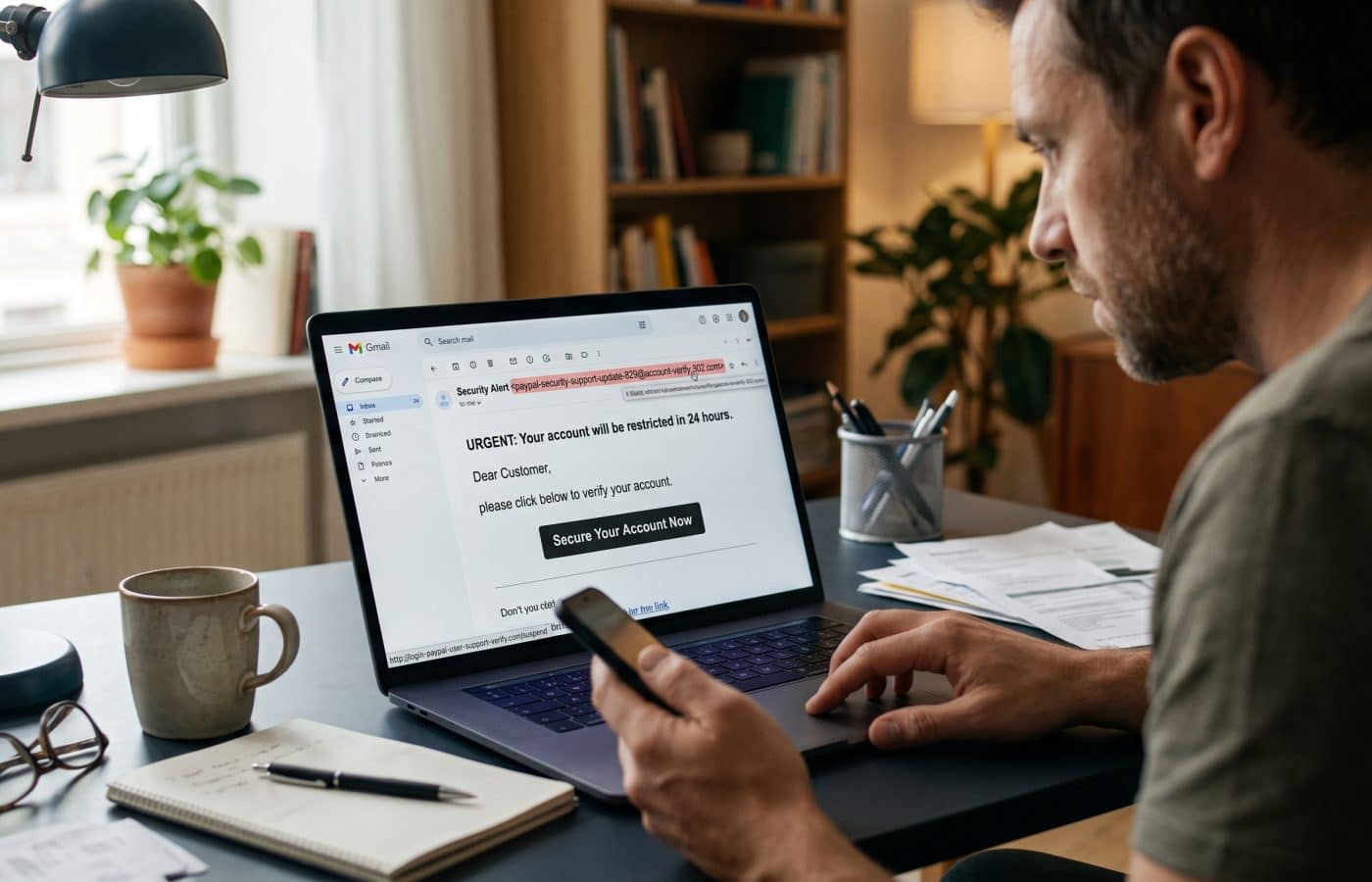
How to Spot Phishing Emails Before You Click

If you want to know how to spot phishing emails, start with this: I have spent a good part of my career cleaning up after one click. Not a sophisticated zero day exploit, not a nation state hacking team, just one person on a busy Tuesday afternoon opening an email that looked exactly like the dozens of legitimate ones they had already handled that day. When I sit down with that person afterward, they almost always say the same thing: “It looked real.”
That is the whole problem in three words. Phishing works because it looks real. So if you want to learn how to spot phishing emails, you have to stop looking for something that looks fake and start looking for something that feels off. Those are two very different skills, and the second one is the one that actually protects you.
In this guide on how to spot phishing emails, I want to walk you through the way I personally read a suspicious message, the specific signals I check, and what I tell clients and family members to do when something does not sit right. None of this requires technical training. It requires a small pause and a few habits that, once you build them, run almost on autopilot.
Why People Still Struggle to Spot Phishing Emails in 2026
People sometimes ask me why phishing has not gone away, given how much money companies spend on filters and security tools. The honest answer is that filters catch a huge amount, but attackers only need a handful of messages to land in the right inbox at the right moment.
What the Data Shows
The numbers back this up. In the FBI’s 2025 Internet Crime Report, phishing topped the list by complaint volume with 191,561 complaints, ahead of extortion, investment fraud, and personal data breaches. The FBI’s Internet Crime Complaint Center received 1,008,597 total complaints that year, up from 859,532 in 2024. And the damage per incident is getting worse. According to SpyCloud’s analysis of the report, phishing complaints dipped slightly from 193,407 in 2024 to 191,561 in 2025, while the losses tied to phishing attacks jumped from $70M to $215.8M.
Fewer complaints, much bigger losses. That tells me attackers are getting more targeted and more convincing, not less active.
The Verizon data tells a similar story from the corporate side. The 2026 Data Breach Investigations Report puts human involvement at 62% of confirmed data breaches, up slightly from 60% in 2025. Verizon also notes that phishing and email remain the primary methods used in social engineering breaches, and that 80% of blocked email attacks in its gateway data were plain phishing.
And the volume is not slowing down. According to the Anti Phishing Working Group, phishing attacks rose 13.8 percent in early 2026, from 853,244 attacks in Q4 2025 to 971,181 in Q1 2026.
So the threat is real, it is growing, and the people on the receiving end are still the deciding factor. That is exactly why knowing how to spot phishing emails matters so much. The deciding factor can be trained.
How to Spot Phishing Emails Without Relying on Typos
For years, security awareness training told people to look for bad spelling and clumsy grammar. That advice made sense in 2010. It is dangerously outdated now.
Attackers have access to the same writing tools everyone else does. Verizon found the median malicious actor leveraged AI across 15 different documented attack techniques, and concluded that AI is mainly accelerating and scaling known attack methods rather than inventing new ones, which includes producing far more convincing phishing text. For the first time in its nearly 25 year history, the IC3 report also features a section on artificial intelligence, accounting for 22,364 complaints and nearly $893 million in losses.
What that means in practice: a phishing email in 2026 may be better written than the real email from your bank. Clean grammar proves nothing. Dropping the typo test is the first step in learning how to spot phishing emails the modern way. I now tell people to judge an email by three things instead of its writing quality:
- Who is really sending it?
- What is it asking me to do?
- Does that request match how this person or company normally behaves?
If you hold every unexpected message up against those three questions, you will catch the vast majority of phishing attempts, no matter how polished they look.
How to Spot Phishing Emails: The Signals I Check Every Time
Here is the actual checklist I run through when I teach people how to spot phishing emails. It takes about ten seconds once it becomes a habit.
1. Spot Phishing Emails by Checking the Sender Address
Your email app shows you a friendly display name like “Microsoft Account Team” or “Sarah from Accounting.” That name can be set to literally anything. The part that matters is the actual address behind it.
On a desktop, click or hover over the sender name. On a phone, tap it. You are looking for mismatches such as:
- A brand name sitting on top of a free webmail address
- A domain that is close but not quite right, like a swapped letter, an extra word, or a different ending
- A company name buried in a subdomain of something completely unrelated
CISA uses a simple example of exactly this. In its phishing awareness scenario, the employee should have noticed that the email address was not from his vendor’s dot com domain, and that the urgent tone came from a hacker running a credential phishing attempt. That is the single most common miss I see in real incidents.
2. The Reply Address Goes Somewhere Else
This one is subtle and catches even careful people. A message can appear to come from a legitimate address while the reply quietly routes to a different one. Business email compromise scams lean on this heavily because the attacker wants a conversation, not a click.
Before you reply to anything involving money, credentials, or sensitive files, start the reply and look at the “To” field. If it is not the address you expected, stop.
3. Urgency, Fear, or a Deadline
Almost every phishing email I have ever analyzed carries pressure. Your account will be suspended. A payment failed. A package is being held. Your boss needs this done in the next fifteen minutes and is stuck in a meeting.
The FTC describes this pattern directly. Scammers often use familiar company names or pretend to be someone you know, and they pressure you to act now or something bad will happen. Common stories include claims of suspicious activity or login attempts, a problem with your account or payment information, or a fake invoice.
Urgency is designed to skip the part of your brain that would otherwise ask questions. When I feel rushed by an email, I treat that feeling itself as a warning sign. This is also why people under constant pressure are easier targets, and why learning how to reduce stress has a quiet security benefit. Legitimate organizations very rarely need you to act within minutes through a link in an email.
4. Spot Phishing Emails by Reading Links Carefully
The text of a link and its actual destination are two separate things. A button that says “View Invoice” or a line that shows a perfectly normal web address can point anywhere. If you only remember one thing about how to spot phishing emails, make it this: never trust a link until you have seen where it really goes.
Hover over every link before you click it (on mobile, press and hold to preview). Then read the destination from right to left, starting at the first single slash after the domain. The real domain is the part just before that slash. Attackers love to front load a familiar brand name at the beginning of a long address so your eyes stop reading before reaching the real destination.
A few patterns I flag immediately:
- Link shorteners in messages that claim to be from a large company
- Addresses that use numbers or odd characters in place of letters
- Destinations hosted on free website builders or file sharing services when the email claims to be from your bank
- Links that open a login page when nothing about the email required you to sign in
My personal rule is simple. If an email tells me to sign in to something, I never use the link. I open a new tab and go to the site the way I always do, through a bookmark or by typing it. If there is really a problem with my account, I will see it there.
5. Attachments You Did Not Ask For
Unexpected attachments are still one of the most effective delivery methods for malware and fake login pages. The file types worth extra suspicion include compressed archives, HTML files, files that ask you to “enable content” or “enable macros,” and PDFs whose only content is a big button or a QR code.
That last one deserves its own mention. QR codes in emails are popular with attackers because they move the click from your monitored work computer to your personal phone, where security tools are often weaker. If an email asks you to scan a QR code to “verify” an account, reset a password, or review a document, treat it exactly like a suspicious link.
6. Spot Phishing Emails That Ask You to Break Process
This is the signal that catches the expensive attacks. Business email compromise rarely includes a malicious link at all. Instead, it asks you to do something that sounds plausible: update a vendor’s bank details, buy gift cards for a client event, send over the W2 files, or approve an urgent wire.
In 2025, business email compromise losses alone reached $3,046,598,558, and combined with investment fraud they made up more than half of all internet crime losses. Fortra’s analysis for the APWG found that the average amount requested in wire transfer BEC attacks in Q1 2026 was $42,663.
The defense here is not technical. It is procedural. Any change to payment details or any unusual money request gets verified through a second channel you already trust, such as a phone number from your records, not one listed in the email. I have watched this single habit stop six figure losses more than once.
7. A Greeting That Is Too Generic, or Too Personal
“Dear Customer” and “Dear User” are classic giveaways, since a company you actually do business with usually knows your name. But be careful with the opposite as well. Targeted spear phishing uses details pulled from LinkedIn, company websites, and past data breaches to sound familiar. An email that mentions your manager by name, your current project, and a recent conference is not automatically safe. Those details are often public.
Familiarity is not verification. The request still has to make sense.
8. Something Asks for Information It Should Already Have
Your bank does not need you to confirm your full account number by email. Your IT department does not need your password. A delivery company does not need your card number to release a parcel you never ordered.
The signs to watch for include messages that create a sense of urgency, ask for personal or financial information, or want you to download a file or click a link. When an email asks for something the sender would already have, or should never need, you have your answer.
9. A Login Prompt or MFA Request You Did Not Trigger
Modern credential phishing often uses a fake login page that passes your password and your one time code straight through to the real site in real time. You type both, the attacker logs in, and you see a normal looking page.
Two habits help. First, if you get a multifactor approval request on your phone that you did not start, deny it and report it. That means someone already has your password. Second, wherever your accounts support passkeys or hardware security keys, use them. They are tied to the real website, so a fake page simply cannot use them. CISA’s phishing infographic strongly encourages organizations to enforce phishing resistant multifactor authentication for exactly this reason.
10. Your Email Client Is Quietly Warning You
Most major email providers add small warnings that people scroll past: “This sender is outside your organization,” “Be careful with this message,” or a note that the sender could not be verified. Some show “via” another domain next to the sender name, which means the message was sent through a different server than the one the sender claims.
These banners are not perfect, but they are free information. If you see one on an email that claims to be from your own company, your bank, or a service you use every day, slow way down.
A Real Example of How to Spot Phishing Emails
Let me show you how this looks in practice using a composite of messages I have seen many times.
The subject line reads “Action Required: Unusual Sign In Activity Detected.” The sender display name says “Microsoft 365 Security.” The email is well written, includes a convincing logo, lists a location and device for the “suspicious” login, and offers a blue button labeled “Review Activity.”
Here is how I would read it:
- Sender: I check the address. It is a long domain that has nothing to do with Microsoft. Strike one.
- Urgency: It says the account will be locked within 24 hours unless I review the activity. Strike two.
- Link: Hovering over the button shows a destination on a free form building service. Strike three.
- Behavior check: If Microsoft really saw suspicious activity, I can confirm it by signing in to my account directly. I do not need this email at all.
The email itself contains no typos and looks professional. If I were judging it on quality alone, it would pass. Judged on who sent it, what it wants, and whether that request makes sense, it fails completely.
That is the core skill behind knowing how to spot phishing emails. You are not grading the design. You are checking the story.
What to Do After You Spot Phishing Emails
Knowing how to spot phishing emails is half the job. The other half is handling them properly so they do not get the next person.
Do not engage with it. Do not click, do not reply, do not unsubscribe, and do not forward it to colleagues asking “is this real?” Every one of those actions creates risk.
Verify independently. If there is a chance the message is legitimate, contact the sender through a channel you already know. Call the vendor using the number on file. Log in to the account directly. Message your coworker on your normal chat tool.
How to Report a Phishing Email
Report it. CISA recommends reporting the phish to protect yourself and others, noting that you will typically find reporting options near the sender’s address or through the report spam button in your toolbar or settings. At work, use your organization’s report button or forward it to your security team the way they ask. In the United States, you can also report scams to the FTC through its online ReportFraud portal. In the United Kingdom, the NCSC encourages people to forward suspect emails to its Suspicious Email Reporting Service at report@phishing.gov.uk, and suspicious texts to 7726.
Reporting matters more than most people realize. Verizon’s simulation data shows that only 20% of individuals report simulated phishing, which means most phishing attempts that reach people never reach the security team. One quick report can get a malicious domain blocked for an entire company.
Delete it. Once reported, get it out of your inbox so you do not stumble back into it later.
What to Do If You Already Clicked
Mistakes happen, including to security professionals. Even people who know exactly how to spot phishing emails slip on a tired day, which is one more reason good sleep matters (our guide on how to fall asleep fast can help there). What separates a minor incident from a major one is how fast you act afterward.
- Disconnect if something installed. If you opened an attachment and something ran, disconnect the device from the network (turn off WiFi or unplug the cable) and contact IT or a trusted technician.
- Change the password immediately. If you entered credentials on a fake page, change that password from a clean device, and change it anywhere else you reused it. Our guide on how to create a strong password walks through building one that is both secure and memorable.
- Check your MFA and recovery settings. Attackers sometimes add their own phone number or recovery email. Remove anything you do not recognize and sign out of all other sessions.
- Call your bank. If you shared financial details or sent money, call your bank’s fraud line using the number on the back of your card. Speed matters for recovering funds. Afterward, compare recent transactions against your budget so unfamiliar charges stand out quickly.
- Tell someone. At work, report it to your security team right away, even if you feel embarrassed. A good security team will thank you, not blame you. At home, the FTC’s guidance on phishing scams walks through what to do if you responded to a phishing email.
Why Speaking Up Fast Matters
I want to stress point five. The worst incidents I have handled were not the ones where someone clicked. They were the ones where someone clicked and then stayed quiet for three days hoping it would go away.
Teaching Your Team and Family How to Spot Phishing Emails
Knowledge is useful, but habits are what actually protect you on a busy day. Teaching the people around you how to spot phishing emails works best when it becomes routine rather than a once a year training session. A few things I recommend to every organization and household I work with:
Create a “pause phrase.” Something short you say to yourself whenever an email asks for money, credentials, or urgency. Mine is simply “who, what, normal?” Who sent it, what do they want, is this normal?
Agree on verification rules in advance. In a business, write down that payment detail changes are always confirmed by phone. This is worth setting up from day one, whether you run an established company or are just learning how to start an LLC. In a family, agree that nobody sends money because of a message, even one that appears to come from a relative, without calling first. This matters a lot for older relatives. Americans over 60 reported approximately $7.7 billion in losses in 2025, up 37% from 2024.
Make reporting easy and blameless. People report what they feel safe reporting. If the first reaction to a reported phish is “good catch,” you will get more reports. If it is “why did you even open that,” you will get silence.
Look Beyond the Inbox
Watch beyond the inbox. Phishing is not just email anymore. The APWG’s Crane Authentication data found that vishing and smishing, meaning phishing by voice calls and text messages, rose 15 percent from Q4 2025 to Q1 2026. Verizon’s 2026 findings point the same way, showing human risk has moved beyond the inbox. The same three questions apply to texts, social media messages, and phone calls.
Use the tools you already have. Turn on the built in spam and phishing protections in your email provider, keep devices updated, use a password manager (it will refuse to autofill on a fake site, which is a great hidden warning sign), and switch to passkeys where you can.
The Bottom Line
Learning how to spot phishing emails is less about memorizing a list of tricks and more about building a reflex. Attackers will keep changing their logos, their wording, and their stories. What they cannot change is that, sooner or later, every phishing email has to ask you to do something: click, open, sign in, pay, or share.
That moment of asking is where you win. Check who sent it. Question what they want. Compare it against what normal looks like. And when something feels off, step outside the email and verify on your own terms.
You do not need to be paranoid. You just need to pause before you click.
FAQ: How to Spot Phishing Emails
What is the easiest way to tell if an email is phishing?
Check the actual sender address, not just the display name, and ask whether the request matches how that person or company normally contacts you. CISA’s Recognize and Report Phishing guide is a good starting reference for anyone learning how to spot phishing emails.
Can a phishing email come from someone I know?
Yes. Attackers frequently compromise real accounts or spoof the names of colleagues, vendors, and relatives. If a familiar contact makes an unusual request, verify it by phone or another channel you already trust. The FTC explains this pattern in its article on how to recognize and avoid phishing scams.
Is it safe to open a phishing email if I do not click anything?
Opening a message is generally low risk in modern email apps, but clicking links, opening attachments, scanning QR codes, or replying is where the danger starts. Report and delete it rather than interacting with it.
Are phishing emails easier to spot now that people know about them?
Not really. AI tools have made phishing text cleaner and more convincing, so spelling mistakes are no longer a reliable clue. The Verizon 2026 DBIR analysis from NINJIO covers how social engineering tactics have diversified.
Where should I report a phishing email?
At work, use your company’s report button or security team process. In the United States, report to the FTC through ReportFraud and to the FBI’s Internet Crime Complaint Center. In the United Kingdom, forward it to the NCSC’s Suspicious Email Reporting Service.
What should I do if I entered my password on a phishing site?
Change that password immediately from a trusted device, update it anywhere you reused it, review your multifactor and recovery settings, and notify your IT team or bank if relevant.
References
- Federal Trade Commission. How to Recognize and Avoid Phishing Scams
- Cybersecurity and Infrastructure Security Agency. Recognize and Report Phishing
- Cybersecurity and Infrastructure Security Agency. Avoid Phishing Attempts: Secure Our World
- Cybersecurity and Infrastructure Security Agency. Phishing Infographic
- Federal Bureau of Investigation. 2025 Internet Crime Report
- HIPAA Journal. FBI Internet Crime Complaint Report 2025
- Fast Company. FBI 2025 Internet Crime Report: Key Takeaways
- SpyCloud. FBI IC3 Report: Losses Hit $20.9 Billion
- dmarcian. 2025 Internet Crime Report: Nearly $21 Billion Lost
- NINJIO. Verizon DBIR 2026: What the Human Element Data Means for Security Awareness
- PhishingBox. Verizon 2026 DBIR: Human Risk Has Moved Beyond the Inbox
- Anti Phishing Working Group. Phishing Activity Trends Report, 1st Quarter 2026
- Fortra. APWG Phishing Activity Trends Report, Q1 2026
- National Cyber Security Centre (UK). NCSC Reveals Top Government Email Impersonation Scams